Company Authentication
On this page
Create a company client secret in the TNID app, then exchange client_id and client_secret at /auth/token for a company access token.
Learn how to get your Company TNID client key and secret to authenticate into the GraphQL API.
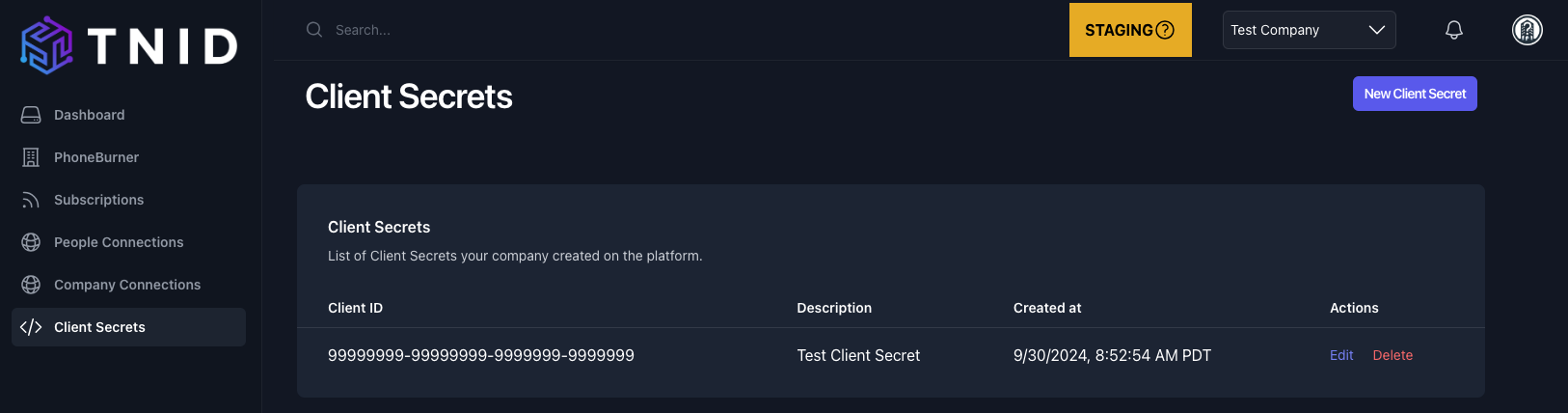
Screenshot of Client Secrets section in GUI
Company users of TNID are able to generate Client Secrets so that they can access the API. To create a Company, first register as an Individual, and then create a Company associated with your Individual profile. Then, assume the role of your Company and click "New Client Secret" in order to create your credentials. You can also create the secret through the API: pass provisionCompanyClientSecret: true when creating the company, or call Create Company Client Secret later.
You are only allowed to view your Client Secret value at creation, so please ensure you save it someplace safe (e.g. 1Password or your environment variables). You will not be able to see it once you close the pop-up (however, you can always create a new Client Secret).
Client secrets do not expire. Access tokens are valid for 7 days and refresh tokens for 30 days (see Refresh Token). If you believe a secret has been compromised, create a new one and delete the old one.
Generate Your Bearer Token
The token endpoint is available in each environment:
| Environment | Token endpoint |
|---|---|
| Staging | https://api.staging.v2.tnid.com/auth/token |
| Zero (pre-production) | https://api.zero.v2.tnid.com/auth/token |
Simply pass the client_id and client_secret data to generate your Bearer token for future API requests:
{
   "client_id": "CLIENT_ID_VALUE",
   "client_secret": "CLIENT_SECRET_VALUE"
}
The response contains an access_token and a refresh_token. Use the access_token as Authorization: Bearer <access_token> to interact with the GraphQL API at /company.
Example Company authentication
Python
import requests

def get_bearer_token(client_id, client_secret):
    url = "https://api.staging.v2.tnid.com/auth/token"

    headers = {
        "Content-Type": "application/x-www-form-urlencoded"
    }

    data = {
        "client_id": client_id,
        "client_secret": client_secret
    }

    response = requests.post(url, headers=headers, data=data)

    if response.status_code == 200:
        token_data = response.json()
        return token_data.get("access_token")
    else:
        raise Exception(f"Failed to retrieve token: {response.status_code} {response.text}")

# Example usage:
client_id = "your_client_id"          # Replace with your actual client ID
client_secret = "your_client_secret"  # Replace with your actual client secret

token = get_bearer_token(client_id, client_secret)
print("Bearer Token:", token)
curl
curl -X POST https://api.staging.v2.tnid.com/auth/token \
  -H "Content-Type: application/json" \
  -d '{"client_id":"<client_id>","client_secret":"<client_secret>"}'